<!DOCTYPE HTML PUBLIC "-//IETF//DTD HTML//EN">

<html>

<head>
<meta http-equiv="Content-Type"
content="text/html; charset=iso-8859-1">
<meta name="robots" content="noindex">
<meta name="GENERATOR" content="Microsoft FrontPage 3.0">
<title>ABS Version 7 R/F Bar Code Scanning</title>
<base target="absmain">
<meta name="FORMATTER" content="Microsoft FrontPage 2.0">
</head>

<body topmargin="0" stylesrc="bots/style_general.htm"
background="../images/absbkgndF.gif" bgproperties="fixed"
link="#0000AC">

<script language="JavaScript">

<!--
    // This detects which browser is being used
        browserName = navigator.appName;    
   // Convert char into an integer        
        browserVer = parseInt(navigator.appVersion);
    
//        if ((browserName== "Microsoft Internet Explorer" &&
//browserVer >= 4)) 
//     {
//        document.body.onmouseover=makeColor;
//        document.body.onmouseout=makeNorm;
//    }

    function makeColor() {
        src = event.toElement;
        if (src.tagName == "A") {
            src.oldcol = src.style.color;
            src.style.color = "C60042"; 
        }
    }

    function makeNorm() {
        src=event.fromElement;
        if (src.tagName == "A") {
            src.style.color = src.oldcol;
        }
    }

// -->

</script>

<table border="0" cellpadding="10" cellspacing="0" width="545">
    <tr>
        <td colspan="2" valign="top" wrap>
        <font face="Verdana, Arial, Helvetica" size="2" color="292994">
        <h1><center>The ABS R/F Bar Code System</center></h1>
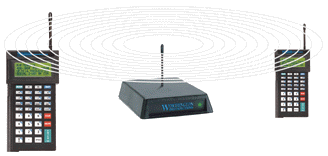
        <P ALIGN="center"><IMG SRC="../images/rfterminals.gif"></P>
        </font>
        <font face="Verdana, Arial, Helvetica" size="2" color="000000">
        ABS R/F Bar Code is a <I>real-time</I> solution which allows
        you to process inventory information, including warehouse transfers, receipts, physical 
        counts and order releases, directly from an easy- to-use, hand-held R/F terminal.</P>
        When you use ABS R/F Bar Code, the information you enter <I>instantly updates the
        inventory file</I> in your ABS Wholesale Distribution, Purchase Order or Point of Sale 
        module. That means when you enter data, such as an inventory count, from the R/F terminal, you won't need to spend additional time entering data again on your PC.</P>
        With ABS R/F Bar Code, you can perform the following functions directly from
        your hand-held terminal:</P>
<UL><UL><UL>
   <LI> inventory counts
   <LI> warehouse transfers
   <LI> count sheets
   <LI> customer orders
   <LI> order releases
   <LI> inventory receipts
   <LI> new UPC records
   <LI> purchase order receipts
   <LI> inventory inquiry
   <LI> inventory posting
   <LI> variance and posting reports
</UL></UL></UL>

<font size=+.5>
<B><P>Benefits of the R/F Bar Code System</P></B><P>
</font>
<UL>
<font size=+.5 color="C60042" ><b>
<LI>Reduce time and expenses for counting inventory.</B></font>
    Because your warehouse personnel will be scanning UPC bar codes and entering quantities directly on their hand-held terminals, they will complete inventory counts faster and with a higher degree of accuracy. And that can cut your operational costs!</P>
<font size=+.5 color="C60042" ><b>
<LI>Ensure consistent data entry, even from new workers.</B></font>
    You establish default settings so that each R/F terminal displays the same prompts for completing a task. By doing this, each user—even your newest hire—must complete the same steps to process inventory information. This helps eliminate data entry procedural errors and produces consistent results from all operators.</P>
<font size=+.5 color="C60042" ><b>
<LI>Identify shortages on the spot.</B></font>
    When you are receiving against a purchase order, you'll be able to spot discrepancies—shortages or overages—quickly...and <I>before</I> the items are moved into the warehouse. Your authorized operators can even print the Inventory Variance Report right from the R/F terminal to notify management about any differences between what you ordered and what your vendor delivered.</P>
<font size=+.5 color="C60042" ><b>
<LI>Go wireless! </B></font>
    The beauty of radio frequency technology is that it is 100% wireless. That means your personnel can move freely throughout the warehouse to perform their inventory tasks, yet still be "connected" directly to your computer system...<I>without</I> the limitation of wires and cables. The only tool they need to complete their work is the R/F hand-held terminal.</P>
<font size=+.5 color="C60042" ><b>
<LI>Add an extra measure of security.</B></font>
    The R/F terminal remains inoperable—even if powered on—until it receives and verifies the operator's user code. This code is based on the combination of a unique <I>logon ID</I> and a unique <I>password</I> which are set up in ABS Password Maintenance. Based on these permissions, you control both who can use the system, as well as the tasks each authorized user can perform.</P>
</UL>

<font size=+.5>
<P><B>How does the R/F Bar Code system work?</B></P></font>
<P>
   In ABS, you set a series of defaults for selected Physical Inventory functions, such as
   counting inventory and entering a receipt. The defaults identify the ABS data entry fields
   you want your employees to complete when they perform an inventory function.</P>
<P>
   When an employee is ready to count inventory, for example, your computer displays the
   defaults on the R/F terminal to instruct the operator...step by step...about what data needs
   to be entered. The R/F terminal transmits all data which has been scanned or keyed in by the
   operator to a Base Station which, in turn, immediately transmits the data directly into your
   ABS inventory system.</P>
<P>
   ABS R/F Bar Code System features R/F products from <A HREF=http://www.barcodehq.com/rfterminal.html target="_top">Worth Data</A>.</P>

<I><P>Radio frequency</I> is a state-of-the-art technology which totally eliminates the need 
   manually enter or download information from a data collection terminal to the inventory
   software on your computer. </P>
<P>
   ABS R/F Bar Code is a one-step solution. It instantly transmits the data your operators
   have scanned or entered on the R/F Terminal <I>directly</I> to the Inventory File in your
   ABS W/D, P/O or POS system.</P>

<B><P ALIGN="JUSTIFY">System Requirements.</B>
   To take advantage of R/F Bar Code, you will need...</P>
<UL>
   <LI>one ABS Inventory module (Wholesale Distribution, Purchase Order or Point of Sale)
   <LI> ABS Bar Code software
   <LI> a UNIX PC or workstation with an RS-232 serial port
   <LI> a Worth Data R/F Terminal (LT71) with built-in with laser scanner
   <LI> one Worth Data R/F Base Station
   <LI> optionally, one or more Worth Data Relay Stations depending on the coverage area.
</UL>
<B><I><P ALIGN="JUSTIFY">For more information </I>about the...</P>
</B><P ALIGN="JUSTIFY">ABS R/F Bar Code System, please contact ABS by phone at (800) 356-4034, by fax at (978) 250-8027, or by E-mail at <a href="mailto:sales@abs-software.com">sales@abs-software.com</a>.</P>
<P ALIGN="JUSTIFY">Worth Data R/F products, please contact Worth Data by phone at (800) 345-4220, by fax at (831) 458-9964, or by E-mail at <a href="mailto:wds@barcodehq.com">wds@barcodehq.com</a>.</P></FONT></BODY>

</font>
 </p>
 </td>
</tr>

<tr>
   <td colspan="2" valign="top" wrap><font face="Verdana, Arial, Helvetica" size="2" color="292994">
    <center>
    <A HREF="http://www.abs-software.com/" target="_top">
    <img src="../images/icon_computer.gif" border="0" width="16" height="16"><b>ABS Home Page</b></A>
    <P>
    </center>
  </td>
</tr>

    <tr>
      <td valign="top" width="50%">
       <font face="Verdana, Arial, Helvetica" size="2">
        We welcome
        your <a href="mailto:sales@abs-software.com">questions
        and comments</a> regarding ABS software.<br>
        Phone: 800-356-4034<br>
        or Fax: 978-250-8027.
      </td>
      <td valign="top" width="50%" align="right">
       <font face="Verdana, Arial, Helvetica" size="2">
        American Business Systems, Inc.<br>
        315 Littleton Road<br>
        Chelmsford, MA 01824<br>
       </td>
    </tr>
    <tr>
        <td colspan="2"><p align="center"><fontface="Verdana, Arial, Helvetica" size="2"> </p>
        <p><center> <a href="copyrght.html">© Copyright 1997-2000</a>
        American Business Systems, Inc. All rights reserved.</font>
        <P>
        <IMG SRC="/cgi-bin/Count.cgi?comma=T|ft=0|tr=Y|srgb=00ff00|prgb=c60042|dd=D|df=absstatsrfbc.dat" ALT="Visitor Counter">
        </CENTER>
        </p>
        </td>
    </tr>
    </font>
</table>

<p>&nbsp;</p>

<p> </p>
</body>
</html>